Product Updates//Updated /2 min read
Activity That Keeps You Posted, Automatically
Your project's Activity feed now fills itself. Every update to your site or app shows up as one plain-English line, every launch comes with a link, and finished change requests, calls and documents appear as they happen. Each Monday you get a one-line summary of the week. Here is where to find it and how to read it.

By Jason Gordon
Founder & CEO, Specloop

You shouldn't have to ask what's happening on your project. Release 1.285 makes the Activity feed on your project fill itself, so the answer is always one glance away.
Find your Activity feed
- Sign in to your portal.
- Scroll to Activity at the bottom of your home page, or open your project and scroll to its Activity section.
- Read from the top. The newest entry is first, each with when it happened.
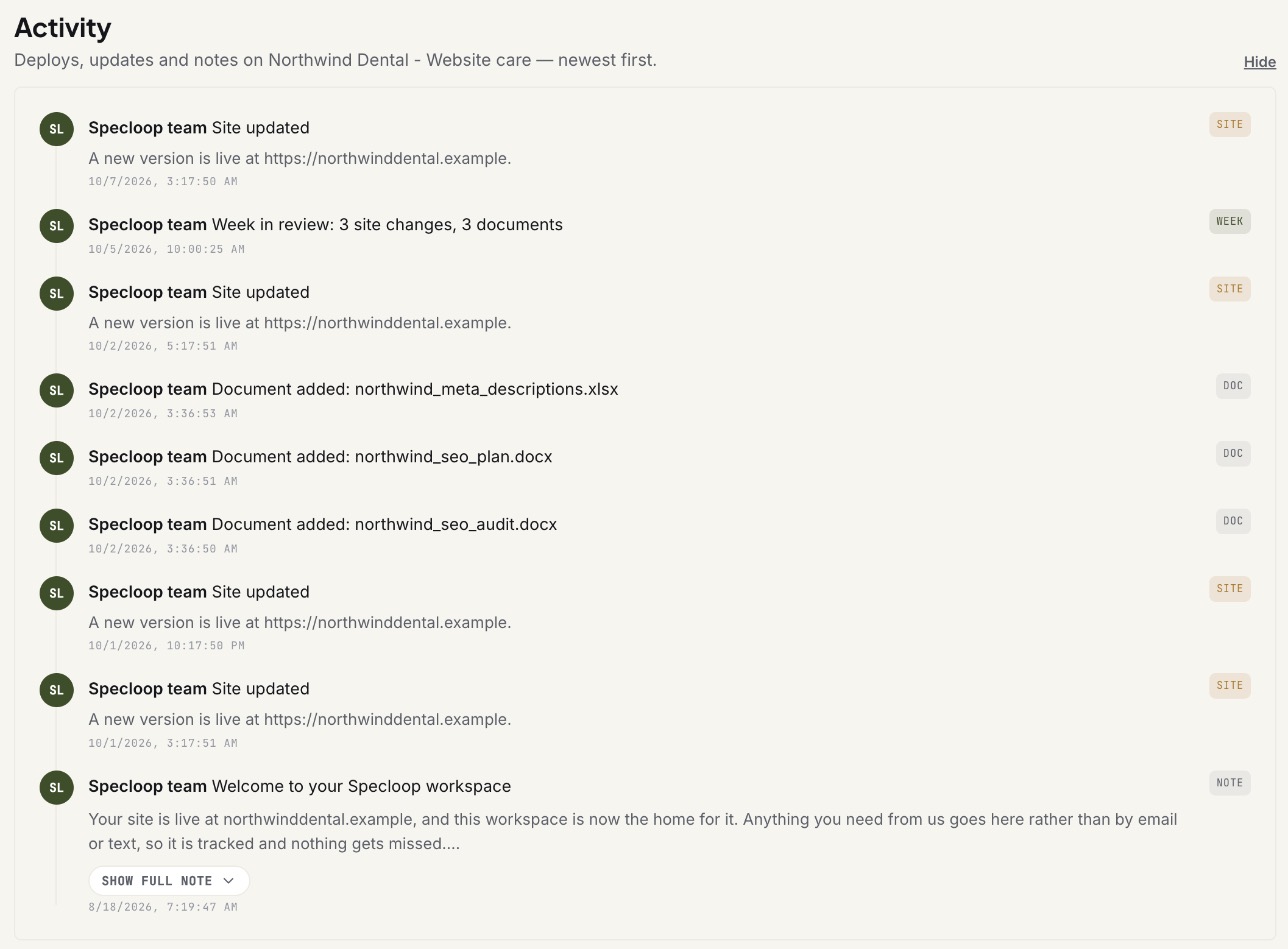
New entries appear on their own. There's nothing to set up on your side.
Every update, in plain English
When our team updates your site or app, a line appears in Activity describing what changed, in words that make sense without a developer next to you: "Added a testimonials carousel and fixed the mobile navigation", not a string of technical notes.
The line is written only from what the team actually recorded for that change. When a change is too small or too technical to describe usefully, you'll see "Code updated (3 changes)" or "Behind-the-scenes improvements" rather than a guess. Anything to do with security is always described that way, on purpose.
Every launch, with a link
When a change goes live, Activity says so: Deployed to production, with a link to the live site so you can see it straight away. When we notice the live site itself has changed, you'll see Site updated with the address, as in the screenshot above.
Everything else that moves your project
Activity now also records, as it happens:
- Pins fixed. When a change you pinned in Change requests is done, you'll see "Fixed pin #12 on /pricing".
- Calls. Each call with our team, with how long it lasted. When the summary is ready, the entry says where to find it: at the bottom of the chat, as our post on call summaries explains.
- Documents. When our team adds a document for you.
- Approvals. When something shared for your review is approved, or changes are requested.
A weekly summary
Every Monday morning, each project with activity the week before gets one line summing it up, like "Week in review: 5 updates, 2 deploys, 1 pin fixed". It only counts what's in your feed. A quiet week doesn't get a summary.
Tips
- Check it before you ask. "Is the new menu live yet?" is usually answered by the latest Deployed to production or Site updated line.
- Follow the link. A launch entry links to the live site, so you can see the change in seconds.
- Spot something wrong? Pin it in Change requests on the exact spot, and the fix shows up here when it's done.
Frequently asked
Questions people ask about this
- No. Our team connects your project's code and hosting on our side, and entries start appearing on their own.
About the author
Jason Gordon
Founder & CEO, Specloop
Jason Gordon is the founder of Specloop, a spec-driven AI development studio that builds production-grade business applications from a complete specification, in weeks, at flat rate, with 100% code ownership. He also builds GeoTest, a free tool that scores how visible a site is to AI search engines. He writes about AI search, spec-driven development, and why most AI builds never reach production.
Follow Jason on LinkedIn →Keep reading
Related posts

Product Updates
Meet the Board, and a Lighter, Friendlier Specloop
Your portal has a new page, the Board: every update, report and walkthrough video from our team in one place, with comments right under each post. The whole portal is lighter and friendlier, your dashboard shows your project plan and your AI search score, and chat now scrolls back through your full history.

Product Updates
Calls and Conference Calls in Specloop, From Ring to Summary
Every conversation in Specloop has a Call button. It rings everyone in the thread on every device they have open, opens video and screen share in its own tab, translates as people talk, and lets you bring in anyone with a link. When the call ends, the transcript and summary land in the chat. Here is how each part works.
Product Updates
Change Requests: Pins Now Tidy Themselves Away
The pin tool is now called Change requests, finished pins are archived instead of cluttering your preview, and the count next to it only counts what's still to do. Here is how to place a change request, follow it, and find it again once it's done.

Product Updates
Calls That File Themselves at the Bottom of Your Chat
Calls in your project chat used to leave their card where the call began, so the summary ended up buried above everything said since. Now the card moves to the bottom when the call ends, and again when the transcript and summary are ready. Here is how to start a call and use what it leaves behind.
Next step
Want a spec for your build?
We write the full specification before any code is generated, then ship in 30–60 days at one flat rate. You own every line.